
Subtitle list
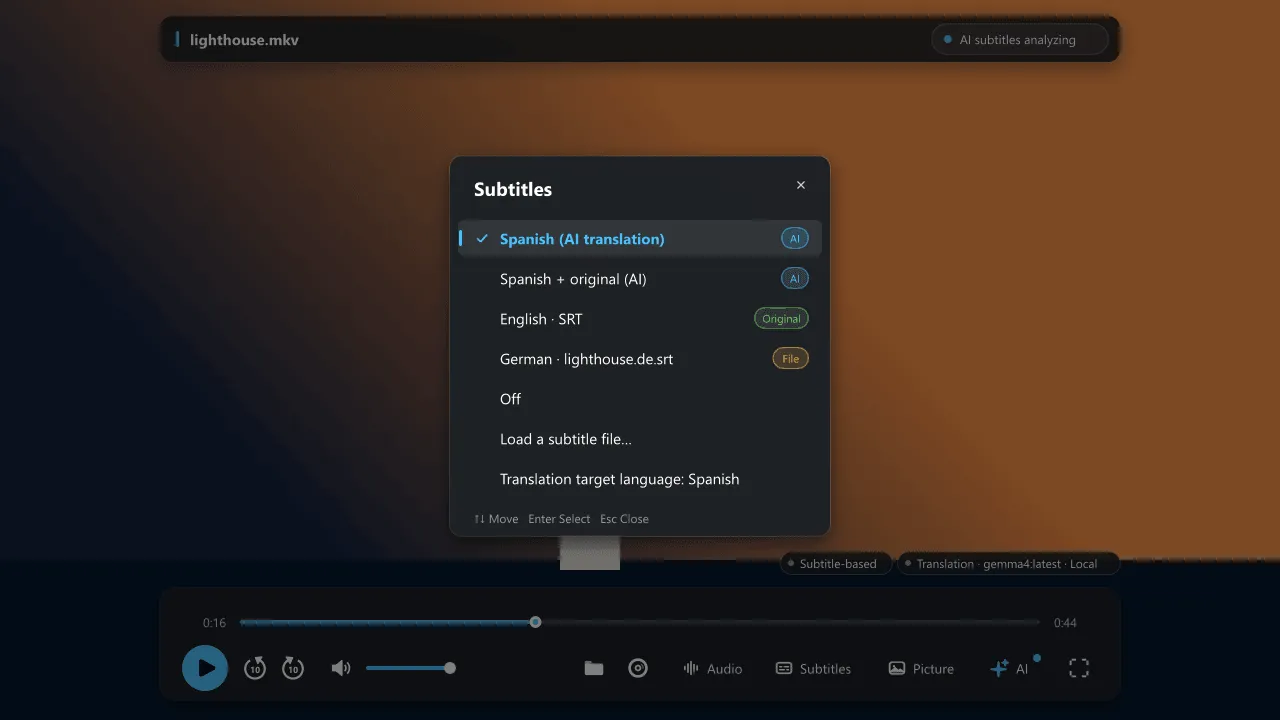
The Subtitles button on the playback bar (also Ctrl+T and Ctrl+N → Subtitle) opens one list for every kind of subtitle. A badge shows where each entry comes from:
| Badge | Source |
|---|---|
[AI] |
Made by NanumPlayer in your target language, either translation only or translation plus original. The display mode applies to AI entries only. |
[Original] |
A subtitle stored on the disc, in the file or uploaded to YouTube, shown exactly as it is with no translation. |
[File] |
A subtitle file next to the video with the same name (name.srt, name.en.srt) or one you loaded yourself. |
[OCR] |
A disc’s image subtitles, read by text recognition. See Image subtitles. |
Automatic choice
Section titled “Automatic choice”- If the video already has a subtitle in your target language (not forced, not commentary, not YouTube auto-generated), NanumPlayer selects it and skips AI work for that file. You can turn this off in Ctrl+N.
- Your target language defaults to the Windows display language. If it equals the spoken language, nothing is translated.
- If you pick an original or file subtitle yourself, AI work (speech recognition, OCR, original-language audio) pauses for that file, whatever the subtitle’s language. Choosing an AI entry again resumes from the current position.
- On a disc, picking an embedded subtitle re-reads from the current position so it appears immediately.
Load a subtitle file
Section titled “Load a subtitle file”Choose Load a subtitle file… or drop a file on the window. Supported formats include .srt, .ass, .ssa, .vtt, .sub and .zip archives. You decide:
- Show as is, or
- Align timing with AI and translate, which fixes the timing against the recognized speech and translates it with your glossary and style.
Subtitle files next to the video with the same name are loaded automatically.
Listening audio and AI input audio
Section titled “Listening audio and AI input audio”The audio you hear and the audio the AI reads are separate. If you switch the playing audio to another language, NanumPlayer asks whether to keep the existing input (default, running work continues), generate from the new audio, or look up saved subtitles for the new audio. Original and dubbed audio differ in wording and timing, so subtitles made from one may not match the other.
YouTube
Section titled “YouTube”For YouTube, uploader-provided subtitles (not auto-generated ones) in your target language and English are requested and shown with the [Original] badge.