
이 페이지는 한국어로도 볼 수 있습니다.한국어로 보기
Generate subtitle files
Ctrl+N → Generate full subtitles… opens the Create subtitle files window. It makes complete SRT files for a local video or a Blu-ray title without playing it. A separate reader pulls only the one stream it needs at full speed (no picture, no sound), so whatever you are watching is not affected.
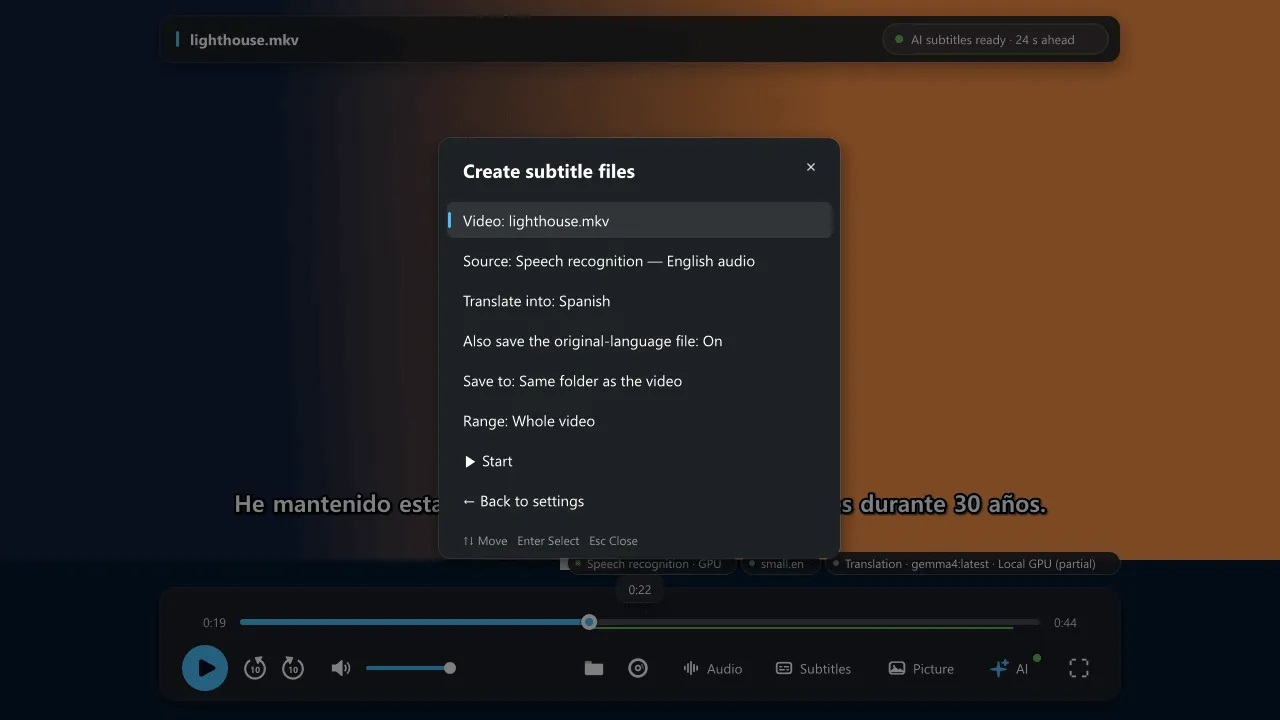
Choose a source
Section titled “Choose a source”- Speech recognition: the audio track is recognized with the same engine (CPU or CUDA) as live subtitles.
- A text subtitle track or an external subtitle file.
- Image subtitles (PGS/DVD) OCR: uses Windows OCR, see Image subtitles. The result is an editable SRT.
What you get
Section titled “What you get”NanumPlayer saves the original-language SRT first, then one translated SRT for each language you choose. The translation server, model and style are the ones from your settings, and the work’s glossary is built by the translation model. A language that already matches the source is not translated.
- Files are named
video-name.<language>.srtand saved next to the video. Discs are saved to%USERPROFILE%\Videos\NanumPlayer, or choose any folder. - Existing files are never overwritten: a number is added (
.2,.3). - Each file is written as
.partand renamed when complete, so a stopped job never leaves a half-written file. - Progress and elapsed time appear in the window and in notifications. Cancel keeps everything that was already saved.
- First 10 minutes only (preview) lets you check OCR packs and translation quality before committing to a whole film.
- Nothing is written unless you start it, and nothing is remembered afterwards.
Good to know
Section titled “Good to know”- OCR of a disc’s image subtitles has to read the whole title, so it is limited by the speed of your optical drive.
- Web videos are not supported here; use the live AI subtitles while playing.
- You can also drive it from scripts: the
nanum-generatecommand and theuser-data/nanum/generateproperty report the status.